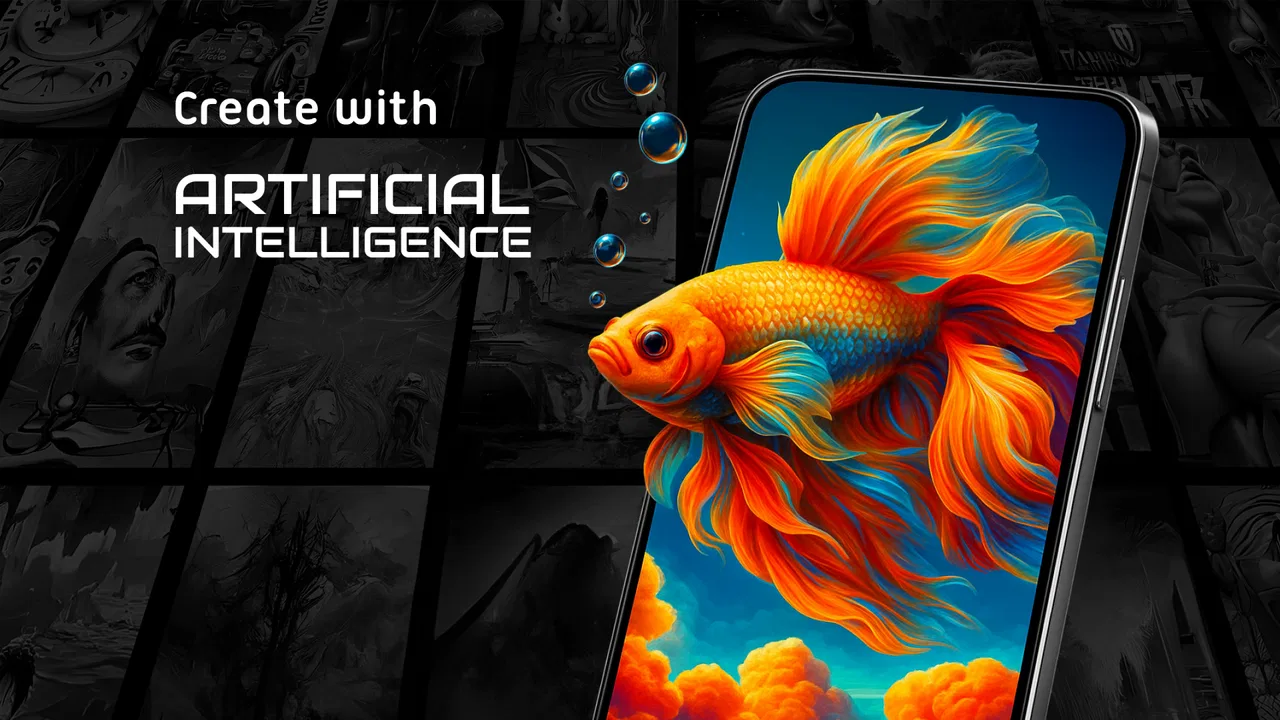
GRUBL™ 4D Live Wallpapers + AI
- 4.7
- Rating
- 10.00M
- Installs
- Free
- Price

 Analysis by App-foxy
I spent time with GRUBL™ 4D Live Wallpapers + AI as a personalization app rather than treating it like a simple wallpaper picker. Its main appeal is movement: 4D and 3D scenes, video backgrounds in HD and 4K, AI-created artwork, and ringtones all sit in one place. That makes the phone feel more personal, but it also means the experience depends heavily on how comfortable you are with visual motion, busy menus, and a steady stream of creative choices.
Developed by TarrySoft, the app is free to install and is rated for Everyone. It has been available since July 18, 2018, and the current version is 3.6.18, with Android 8.0 or later required. Its popularity is easy to understand: it has passed ten million installs, holds a 4.7 average from roughly 408,000 ratings, and has about 8,700 written reviews. Those figures suggest a well-established app, although popularity alone does not guarantee that its animated style will suit every phone or every user.
How the interface feels to read and navigate
My first impression was that GRUBL™ 4D Live Wallpapers + AI is designed to be browsed visually. You are encouraged to look through animated examples, compare styles, and decide what fits your screen. That is enjoyable when I am in the mood to explore, but it is less direct than a basic wallpaper application where I can open a folder, choose an image, and finish in a few taps.
You May Also Like

 Blood Strike: 2.5 Anniversary
Blood Strike’s Loadouts Turn Every Drop Into a Tactical Gamble
A close look at Blood Strike’s custom loadouts: how fast access to signature weapons reshapes its battle royale rhythm, rewards preparation, and narrows the gap between fights.

 Pandora - Music & Podcasts
Pandora’s Music Is Easy to Start, but Harder to Recover
Pandora’s strength is its low-effort path from a seed to a station. Its weak spot is how much confidence it asks you to place in connection, setup, and quiet recovery.

 8 Ball Pool
 Is Built on Rivalries, Rematches, and Routine
A close look at the rivalries, rematches, shared routines, and unanswered safety questions that turn a quick pool match into a persistent mobile community.

 Samsung Music
’s Quiet Strength Is Playing What You Already Own
Its reach comes less from spectacle than from dependable access to a personal library. That simplicity is both the app’s strongest retention engine and its ceiling.

 AccuWeather: Weather Radar
AccuWeather Review: A Quick, Clear Forecast for Everyday Decisions
For everyday plans, the best forecast is the one you can understand quickly. AccuWeather makes rain timing, radar, and local conditions easy to act on, with a few trade-offs.

 Hill Climb Racing
Why Hill Climb Racing Still Turns Crashes Into One More Run
A tiny car, a bumpy hill and one more upgrade: Hill Climb Racing keeps resurfacing because its simple chaos makes every near-miss feel personal.
More From Our News Desk



The visual-first approach has an accessibility trade-off. A moving preview can communicate the character of a wallpaper faster than a text label, yet it can also make it harder to distinguish one option from another when several previews are bright, dark, or animated in similar ways. I found it easier to make a decision when I approached the app with a clear idea, such as “a calm dark background” or “something with a technological look,” rather than scrolling without a plan.
For someone with good near-screen vision, the artwork is the strongest part of the navigation. Details that would be difficult to describe in words are immediately visible. On the other hand, users who rely on larger text, strong contrast, or a less crowded presentation may need more patience. The app is centered on imagery, so the visual samples carry much of the meaning. That can be helpful for people who prefer showing rather than reading, but it is not automatically comfortable for people who find layered graphics tiring.
I also recommend separating discovery from installation. I would browse several options first, then apply one only after checking how it looks behind icons and on the lock screen. A wallpaper that looks impressive in a full-screen preview can become distracting once notification text, widgets, and app labels are placed over it. This small workflow makes the app feel more manageable and avoids repeatedly changing the phone while trying to compare designs.
Using the AI Creator without losing control
The AI Creator adds a different kind of navigation because it turns the app from a gallery into a starting point for personal ideas. Instead of choosing only from finished backgrounds, I can think in terms of a mood, color combination, or subject and use that as the basis for something more individual. The useful insight here is that the creator works best when I begin with a practical screen goal, not just a vague request for something “cool.” A dark, low-detail concept is more likely to remain usable behind icons than an image packed with bright objects.
AI-generated artwork is also a place where expectations should stay realistic. I would treat the result as a wallpaper concept rather than assume every creation will be immediately suitable for daily use. Details may compete with text, and a visually striking image may be tiring after several hours. Creating several variations and judging them at the actual home-screen size is a better workflow than selecting the first attractive preview.
Motion, sound, and different ways of using the app
The central question is not whether the wallpapers look impressive; many of them do. The more important question is whether animated backgrounds help or hinder your everyday phone use. I personally enjoy a moving background when I want the device to feel more expressive. I am less enthusiastic when I need to read quickly, conserve attention, or keep the screen visually quiet.
For users who are sensitive to motion, flashing effects, or rapidly changing imagery, this category deserves caution. A live wallpaper remains part of the phone’s visual environment even when I am not actively browsing the app. Someone who experiences discomfort from movement may prefer a still image, a simple gradient, or a conventional wallpaper tool instead. GRUBL™ 4D Live Wallpapers + AI is not the right recommendation simply because a person wants personalization; the type of personalization matters.
There is a practical advantage to choosing a restrained animated design. A slowly shifting background with broad areas of color is easier to live with than a highly detailed scene with constant action. It also tends to leave more space for icons and notification text. This is one of the app’s less obvious strengths: the large catalog and creative tools make it possible to search for a balance between personality and readability, provided I do not judge a wallpaper only by its preview spectacle.
The app also includes ringtones, which broadens the personalization beyond the display. That can be useful for someone who wants the phone’s visual and audio identity to feel coordinated. It can also create a sensory overload problem if animated visuals and distinctive sounds are both used aggressively. I would change one element at a time, live with it for a day, and then decide whether another layer actually improves the experience.
A realistic everyday scenario
Imagine using the phone during a busy commute. I might want a background that makes the device recognizable at a glance, but I also need to read a message quickly in changing light and avoid unnecessary visual distraction. In that situation, I would choose a darker, less intricate live wallpaper, keep the home screen uncluttered, and avoid pairing it with an attention-grabbing ringtone. The same app that feels playful at home can become too demanding when I am walking, traveling, or switching between tasks.
For a teenager customizing a new phone, the app can be a fun creative outlet. For someone using the device as a work tool, a subtle background may be the better choice. For a family member who finds motion uncomfortable, I would recommend a static alternative instead of assuming the animated catalog will be inclusive by default. These are not contradictions; they show why the app’s value depends on context.
Situational access and device comfort
GRUBL™ 4D Live Wallpapers + AI is most enjoyable when I have time to browse and a screen capable of showing the artwork clearly. A larger display makes the previews easier to appreciate, while a smaller phone can make busy compositions feel more compressed. I would also test a chosen background in both bright and dim surroundings. A design that looks balanced indoors may lose contrast outdoors, and a vivid design that works in daylight may feel harsh at night.
The HD and 4K options are attractive for people who care about sharp, detailed backgrounds, but higher visual quality is not automatically better for every situation. Fine detail can make icons harder to locate, especially for users who benefit from simple visual landmarks. I prefer to think of resolution as a choice rather than a target: select the clearest background that still leaves the interface easy to scan.
People with limited hand movement may appreciate a workflow that minimizes repeated changes. I would shortlist a few wallpapers, preview them carefully, and apply the final choice once rather than constantly experimenting. Any app built around browsing can become tiring when it requires many small gestures, so planning the selection helps. Users who rely on alternative input methods should judge the app on their own device and setup, because the experience can vary with the phone’s system controls and interaction preferences.
There is also a cognitive side to access. Endless visual choice can be enjoyable, but it can make a simple task feel open-ended. If I only want to replace a background, the AI Creator, video options, and ringtone section may feel like extra decisions. My solution is to define the purpose before opening the app: refresh the lock screen, find a calm home background, create a personal image, or choose a sound. That keeps the app from turning a two-minute task into an unplanned browsing session.
Free access and purchase decisions
The app is free, which makes it easy to try without committing money first. It also includes in-app purchases ranging from $0.49 to $99.99 per item. I would therefore explore the free experience before becoming attached to a particular premium-looking style. The broad price range means users should pay attention to what is being selected before confirming a purchase, especially if children or other family members use the device.
For me, the free entry point is enough to decide whether the animated approach fits my habits. I would not pay simply to solve a problem that a still wallpaper already solves. A purchase makes more sense only when a specific visual style, creative option, or sound adds lasting value rather than temporary novelty. This is particularly important for users who want a quiet, low-maintenance phone: the app can provide that only if I choose carefully, not because every option is equally practical.
Battery and performance are also sensible considerations with any live or video background. I would watch how the phone behaves over a normal day after applying one, particularly on an older device. The minimum operating system is Android 8.0, but compatibility with the operating system does not mean every phone will feel equally smooth. If the device already struggles with animations or has limited power, a static alternative may provide a better overall experience.
Where the experience still creates barriers
The biggest barrier is the app’s dependence on visual stimulation. The same movement that makes the product distinctive can reduce comfort for users with motion sensitivity, visual fatigue, migraines, or a preference for stable screens. Because the app’s identity is built around 4D, 3D, and video backgrounds, someone seeking maximum calm should start with a traditional static wallpaper app instead.
A second barrier is the gap between creative appeal and practical readability. Detailed artwork may be beautiful but poor behind text and icons. This affects almost everyone, but it matters more for users with reduced vision or anyone who needs strong visual separation. I would prioritize open areas, darker tones behind light text, and clear contrast around the places where icons will sit. The preview should be judged as a working phone screen, not as a poster.
A third issue is choice overload. The combination of live wallpapers, video backgrounds, AI creation, and ringtones gives the app range, but range can become friction. Someone who wants a predictable, text-led interface may find the browsing process less comfortable than a simple gallery. The app is at its best for users who enjoy experimenting; it is less suitable for people who want one obvious route from opening the app to applying a background.
I would also avoid treating the Everyone rating as a promise that every visual experience will suit every person. It describes the general content age level, not individual sensory comfort. Parents, caregivers, and users with specific needs should still preview the choices themselves. The same applies to shared devices: a wallpaper that one person finds fun may be distracting or uncomfortable for another.
Finally, the app is not a replacement for system-level accessibility tools. It can change the look and sound of a phone, but it should not be expected to provide the specialized support offered by features such as enlarged interface settings, screen readers, reduced-motion preferences, or high-contrast controls. I would use those operating-system tools first and treat GRUBL™ 4D Live Wallpapers + AI as an optional layer of personalization.
My inclusive verdict
After using it, I see GRUBL™ 4D Live Wallpapers + AI as a strong choice for people who want their Android phone to feel animated, expressive, and different from a standard static setup. TarrySoft has combined several forms of customization in one app, and the AI Creator gives the experience more depth than a fixed collection of backgrounds. The large user base and 4.7 average also show that the concept connects with many people.
My recommendation comes with a clear condition: choose for comfort, not just visual impact. Start with a calm design, check it behind real icons, test it in both bright and dark environments, and consider how motion affects your attention throughout the day. If the background remains readable and comfortable, the app can make an ordinary phone feel surprisingly personal.
I would recommend it to creative users, people who enjoy changing their home screen, and anyone curious about AI-assisted wallpaper ideas. I would steer users with strong motion sensitivity, older or slower devices, or a preference for minimal interfaces toward a static wallpaper alternative. For those in between, the best approach is selective use: enjoy the catalog and creator, but keep the final screen simple.
My final view: this is a capable personalization app with genuine creative range, but its accessibility depends on the choices you make inside it. Its strongest feature is freedom; its main weakness is that freedom can bring motion, clutter, and extra decisions. Used thoughtfully, it is an enjoyable way to personalize a phone. Used without considering readability or sensory comfort, it can make everyday interaction harder rather than better.
FAQs for GRUBL™ 4D Live Wallpapers + AI
01What is GRUBL™ 4D Live Wallpapers + AI and how does it enhance my device?
GRUBL™ 4D Live Wallpapers + AI is an innovative app that transforms your Android or iOS device with dynamic 4D live wallpapers. Utilizing AI technology, it offers a personalized visual experience, adapting to your preferences and device interactions. It's a perfect choice for users seeking to elevate their phone's aesthetic with vibrant, moving backgrounds.
02Does GRUBL™ affect my device's battery life?
While GRUBL™ 4D Live Wallpapers + AI provides stunning visuals, it's designed to be efficient on battery usage. However, like any live wallpaper, it may consume more power than static backgrounds. The app includes settings to manage performance and optimize battery usage, ensuring a balance between visual appeal and battery efficiency.
03Is GRUBL™ compatible with all devices?
GRUBL™ 4D Live Wallpapers + AI is compatible with most Android and iOS devices. However, to enjoy the full 4D experience, your device should support live wallpapers and have sufficient processing power. It's recommended to check the app's requirements in the app store to ensure compatibility with your specific device model.
04What customization options does GRUBL™ offer?
GRUBL™ provides extensive customization options, allowing users to personalize their wallpapers with various themes, colors, and effects. The app also utilizes AI to suggest wallpapers based on your preferences and usage patterns. Whether you prefer abstract designs or nature scenes, GRUBL™ ensures a unique and tailored experience.
05Are there in-app purchases or advertisements in GRUBL™?
GRUBL™ offers both free and premium versions. The free version includes ads and a limited selection of wallpapers. Upgrading to the premium version removes ads and unlocks the full range of wallpapers and features. Users can explore the app to determine if the premium features align with their preferences and needs.
Pros
- Stunning 4D visuals bring your screen to life.
- Wide range of themes for personalization.
- AI-generated wallpapers add uniqueness.
- Regular updates with new wallpapers.
- Easy to navigate and user-friendly interface.
Cons
- Frequent ads can be intrusive.
- Some features require in-app purchases.
- Battery consumption can be high.
- Not all devices support 4D effects.
- Occasional lag on older devices.

GRUBL™ 4D Live Wallpapers + AI
Gallery